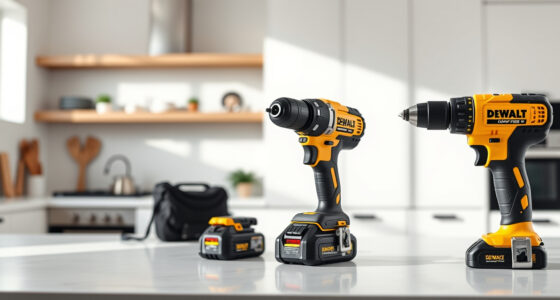
If your DEWALT cordless drill or other power tool isn’t charging properly, it can halt your projects and cause frustration. Fortunately, most charging issues are fixable with some basic troubleshooting. This guide walks you through safe, step-by-step methods to get your DEWALT batteries back in action and ensure your tools perform reliably.

Get garden gear delivered free — and shop member deals
- Fast, free delivery on millions of items
- Access to Prime Big Deal Days deals on October 6–7
- Prime Video, Amazon Music and more included
Before starting, always ensure your workspace is safe, unplug the charger, and handle batteries carefully to avoid injury.
Key Takeaways
| Check the Charger and Power Source | Ensure the charger is plugged in and functioning by testing it with a different outlet or device. |
| Inspect the Battery Contacts | Clean the battery contacts with a dry cloth or a small brush to remove dirt or corrosion. |
| Test with a Different Charger | Use another compatible DEWALT charger to determine if the issue is with the charger or battery. |
| Evaluate Battery Age and Condition | Older batteries may lose capacity; consider replacing if they no longer hold a charge. |
| Reset the Battery | Some batteries have a reset function—try removing and reinserting the battery after a few minutes. |
Step 1: Verify Power Supply and Charger
- Plug the charger into a known working outlet.
- Check if the charging indicator lights turn on.
- If no lights appear, test the outlet with another device or try a different outlet.
Step 2: Inspect and Clean Battery Contacts
- Remove the battery from the tool.
- Wipe the metal contacts on the battery and charger with a dry, lint-free cloth.
- Look for any corrosion or debris and gently remove it.
Step 3: Test with a Known Good Charger
If available, connect your battery to another DEWALT charger of the same model. If it charges normally, your original charger may be faulty.
Step 4: Assess Battery Condition
If the battery is old or heavily used, it might no longer hold a charge. Consider replacing it with a new compatible battery, such as the DEWALT 20V MAX 5 Ah Lithium-Ion Battery 2-Pack.
Step 5: Reset or Replace the Battery
Some batteries can be reset by removing and reinserting them after a few minutes. If that doesn’t work, replacing the battery is often the best solution.
The Products in This Guide

DEWALT 20V MAX Cordless Drill Driver Set
- ✔ LED Light: Yes
- ✔ Two Speed: Yes
- ✔ Chuck Type: Single-sleeve ratcheting

DEWALT Drill Bit Set
- ✔ Durability: High
- ✔ Compatibility: Universal with DEWALT drills
- ✔ Ease of Use: Simple to identify and use
DEWALT 20V MAX Cordless Drill Driver Set
The DEWALT 20V MAX Cordless Drill Driver Set is a compact, lightweight, and powerful tool ideal for various tasks. If your battery isn’t charging, these troubleshooting steps can help restore its functionality.
Pros:
- Brushless motor delivers more run time
- Lightweight and ergonomic design
- LED light for visibility
- 2-speed transmission for versatility
Cons:
- Battery may degrade over time
- Requires compatible charger
- Limited to 20V MAX system
Best for: DIYers and professionals needing reliable drilling in tight spaces
Not ideal for: Heavy-duty industrial applications or older batteries
Bottom line: A versatile drill set with reliable power, but keep an eye on battery health for optimal performance.
DEWALT Drill Bit Set
Pair your DEWALT drill with this durable 14-piece drill bit set, designed for plastic, wood, and metal, ensuring you have the right bit for every task.
Pros:
- High-speed steel for durability
- Split point tip reduces walking
- Rust-resistant coating
- Easy size identification
Cons:
- Not for heavy industrial use
- Limited to basic bit sizes
- Requires proper storage
Best for: Home improvement projects and light to medium work
Not ideal for: Heavy-duty construction or commercial use
Bottom line: A reliable drill bit set that complements your DEWALT drill for a variety of materials.
Frequently Asked Questions
Why won’t my DEWALT battery charge?
Common reasons include a faulty charger, dirty contacts, an old or damaged battery, or a power supply issue. Follow the steps outlined to troubleshoot.
How can I tell if my battery is dead?
If the battery does not show any charge after multiple attempts and the charger indicator remains inactive, it may need replacement.
Can I fix a dead battery myself?
While some minor cleaning or resetting can help, most dead batteries require replacement for reliable performance.
Is it safe to open the battery case?
No, opening the battery case can be dangerous due to potential exposure to hazardous materials and voids warranty. Always use proper disposal methods for damaged batteries.
Revitalize Your DEWALT Power Tools with Proper Troubleshooting
Dealing with charging issues can be frustrating, but with careful inspection and testing, you can often identify the problem and restore your DEWALT tool’s performance. Remember to prioritize safety, use genuine parts, and consider replacing worn batteries to keep your projects on track.
Affiliate disclosure: As an Amazon Associate we earn from qualifying purchases. Prices and availability are accurate as of the time of publishing.
Halloween Picks
halloween
As an affiliate, we earn on qualifying purchases.